Manage Your Company
Settings in One Place
Control your company's HRMS experience from one place. Manage business information, branding, user access, document templates, referral settings, and administrative preferences through a centralized dashboard built for efficient day-to-day management
What Is Profile Settings in Waggex?
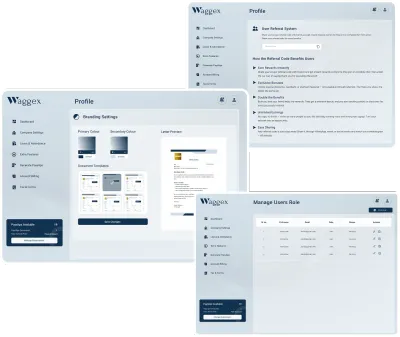
Profile Settings is your company's central administration hub in Waggex. Manage business information, user access, branding preferences, document templates, referral settings, and other organization-wide configurations from one place instead of navigating multiple modules
Configure your HRMS to match your company's requirements while keeping settings organized, secure, and easy to manage for administrators
Referral System
Access and manage employee referral programs, track referrals, and configure referral-related settings from the company portal.
Manage Users
Add, edit, remove, and manage employee accounts, roles, and permissions within the company portal.
Branding Settings
Customize company branding, document templates, PDF colors, logos, and themes for HR letters and payslips.
Create Branded HR Documents with Ease
Branding Settings let you personalize HR and payroll documents with your company's identity. Add your logo, customize PDF templates, and apply brand colors to create professional offer letters, payslips, appointment letters, experience letters, and other employee documents with a consistent look
Document PDF Templates
Select professional templates for HR and payroll documents.
Offer Letter Templates
Choose branded offer letter layouts for new employees.
Experience Letter Templates
Generate professional experience letters using selected document templates.
Payslip Templates
Create clean and branded payslips for salary processing.
Primary Template Color
Set the main color used in the selected PDF document template.
Secondary Template Color
Choose a secondary color to improve the overall document appearance.
Live Letter Preview
Preview the selected template and colors before saving the branding settings.
Manage User Access with Role-Based Permissions
Control who can access your Waggex account with role-based user management. Add new users, assign permissions, update access levels, and manage administrator or HR accounts from one place, ensuring every team member only sees the information relevant to their role.
Add company users
Update user details
Manage access control
Control internal portal usage
Support role-based access
Improve company account security
Centralize Your Employee Referral Program
Access referral settings, review referral history, and manage employee referral records from one place. Keep referral information organized, simplify administration, and maintain better visibility across your company's referral activities
Referral System Can
Help With
Referral code access
Referral history
Referral tracking
Referral benefit visibility
Company referral management
Set Up Your Company in Minutes
Most Indian businesses still rely on WhatsApp check-ins and manual registers. Here is how Waggex changes that.
Company Sign Up
Company administrator creates a Waggex account and logs in to access the company portal and Profile Settings.
Complete Company Setup
Enter company information, configure business details, upload branding assets, and complete the initial HR setup.
Configure Company Preferences
Set working days, attendance rules, document branding, referral settings, and user management preferences.
Manage Users & Permissions
Add company users, assign role-based permissions, and control access to HR, payroll, attendance, and other modules.
Customize Profile Settings
Manage referral options, company branding, document templates, notifications, and other account preferences from one place.
Save & Apply Settings
Save all configured settings to instantly apply them across your company portal and employee management system.
Benefits of Waggex Profile Settings
Centralised Company Settings
Manage branding, users, referral preferences, document templates, and other company settings from one organized dashboard instead of multiple modules.
Active User Control
Assign permissions based on employee roles, giving HR teams, managers, and administrators secure access to only the features they need.
Professional Document Branding
Customize logos, brand colors, and document templates to create professional HR letters, payslips, and employee documents with a consistent identity.
Organised Admin Experience
Keep company configurations organized in one place, making it easier to manage settings without interrupting everyday HR and payroll operations.
Improved Management
Easily add users, update permissions, and manage administrator access while maintaining better control over company information and sensitive data.
Useful for Growing Businesses
As your organization grows, update users, branding, referrals, and company preferences from one platform without adding administrative complexity.
Connected with Waggex HRMS Platform
Profile Settings supports your complete Waggex HRMS setup, including:
What Our Customers Say
Businesses across India trust Waggex to get payroll right every month, without fail.
Frequently Asked Questions
Common questions from Indian businesses evaluating Waggex GPS Attendance Software
Simplify Company Administration with Waggex
Manage company information, branding, users, and organization settings from one platform designed to save time and keep everything organized
Download Waggex Mobile Apps
Access Company, Staff & FaceLens Apps on Android & iOS. Scan the QR code to download and get started quickly

Payroll Software - Waggex
Built for startups and companies to manage employees, attendance, payroll, shifts & daily operations from anywhere with one smart and easy-to-use HRMS platform.

Attendance App - Waggex
Employees can mark attendance, apply leaves, view payslips, manage tasks, and stay connected with HR from anywhere using the mobile app. Scan QR To Download App.

Biometric Attendance - Waggex
Transform any device into a smart attendance station with Waggex FaceLens App, featuring AI-powered face recognition, geo-fencing, and real-time employee attendance tracking.
Simplify Payroll Processing With Waggex
Run accurate, compliant payroll every month using payroll management software built for the way Indian businesses actually operate. No spreadsheets. No errors.