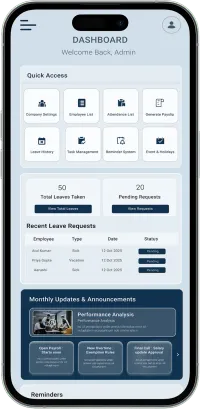
How To Use

Everything You Need to Get Started With Waggex

Explore simple tutorials that guide you through account setup, company configuration, employee onboarding, attendance tracking, leave management, payroll processing, compliance, and payslip generation

intro video

80+

Total Companies

180+

Total Employees

71%

HR Admin Time Saved

5,465+

Payslips Generated

Essential Waggex Tutorials for New Users

Follow step-by-step video guides designed to help you set up Waggex correctly and manage payroll, attendance, and employee operations with confidence

Intro

Intro

Watch on Youtube
How to Generate a Payslip Instantly Online

How to Generate a Payslip Instantly Online

Watch on Youtube
Payroll Software & Attendance App | Best Attendance Software India | Waggex HRMS Intro

Payroll Software & Attendance App | Best Attendance Software India | Waggex HRMS Intro

Watch on Youtube

Follow This Step-by-Step Waggex Setup Flow

Use this learning path to understand Waggex in the correct order and train your HR team faster.

1

Create Account

Sign up, log in, and access your Waggex dashboard to begin setting up your HR and payroll system.

2

Company Setup

Add company details, branches, locations, departments, and attendance policies from one place.

3

Shift Management

Create work shifts, define working hours, break timings, and assign employees to schedules.

4

Leave Policy

Configure leave types, annual leave balances, approval workflows, and employee leave rules.

5

Events & Holidays

Add national, state, festival, and company holidays to maintain an accurate attendance calendar.

6

Employee Onboarding

Add employees, salary structures, documents, contact information, and mobile app access.

7

Attendance Setup

Enable manual, selfie-based, FaceLens, QR code, geo-location, or kiosk attendance tracking.

8

Payroll Generation

Review attendance, calculate salaries, process payroll, and generate professional payslips instantly.

9

Reports & Compliance

Access payroll reports, attendance summaries, statutory records, and employee data insights.

Explore Waggex Feature Tutorials

Embed your YouTube videos inside these cards or link each card to the relevant tutorial video.

Waggex Setup Guide - Part 1 | Payroll Software & Attendance App Full Process

Waggex Setup Guide - Part 1 | Payroll Software & Attendance App Full Process

Watch on Youtube
Waggex Setup Guide - Part 2 | Sign Up, Company Setup & Shift Management | Payroll Software India

Waggex Setup Guide - Part 2 | Sign Up, Company Setup & Shift Management | Payroll Software India

Watch on Youtube
Waggex Setup Guide - Part 3 | Leave Management System & Employee Leave Approval | HR Software

Waggex Setup Guide - Part 3 | Leave Management System & Employee Leave Approval | HR Software

Watch on Youtube
Waggex Setup Guide - Part 4 | Holiday Management System & Payroll Integration | Payroll software

Waggex Setup Guide - Part 4 | Holiday Management System & Payroll Integration | Payroll software

Watch on Youtube
Waggex Setup Guide - Part 5 | Create Employees & Bulk Upload | HR Payroll Software India

Waggex Setup Guide - Part 5 | Create Employees & Bulk Upload | HR Payroll Software India

Watch on Youtube

What Our Customers Say

Businesses across India trust Waggex to get payroll right every month, without fail.

We are using Waggex for staff attendance, and the selfie feature is quite useful, especially with geo-location. Sometimes the camera takes a bit longer to open, so improving speed and adding a quick capture option would enhance the experience. Otherwise, the software is very reliable.

neha

★★★★★

Split ac Window ac package unit water cooler deep freezer washing machine stabilizer greaser ac rent Repair second hand ac sale &purchase Etc.

Ram Sagar

★★★★★

We were managing attendance and payroll manually before using Waggex Payroll, and it used to take a lot of time every month. After switching to Waggex, our HR process became much smoother and more organized.

dhiman rishav

★★★★★

Frequently Asked Questions

Common questions from businesses learning how to use Waggex for the first time

Start with Waggex Setup Guide Part 1 on the Waggex YouTube channel. It covers the full platform walkthrough including account setup, attendance configuration, and payroll generation. Parts 2 through 5 cover individual features in more detail.
Yes. The Waggex App enforces Grade SSL Encryption, Multi-Factor Authentication, and Encrypted Backups to protect all business data. Payroll records, employee information, and attendance logs are stored securely with role-based access controls so only authorised users can view or make changes.
Yes. Waggex supports multiple company accounts under a single login. Each company operates independently with its own employees, payroll settings, and attendance configurations. Switch between accounts from the same dashboard without logging out.
Most businesses complete the initial setup in one to three days depending on team size and configuration complexity. The five-part setup guide video series covers everything needed to go live with payroll and attendance from scratch.
Yes. The Waggex YouTube channel has dedicated tutorials for company setup, shift management, leave management, holiday configuration, employee onboarding, and payslip generation. New feature tutorials are added regularly as the platform grows.
Yes. All Waggex tutorial videos are publicly available on the Waggex YouTube channel. You can share individual video links or the full channel with your HR and finance teams for self-paced learning.

Manage Compliance & Payroll From One Connected System

Simplify payroll processing, employee management, and compliance record tracking with one integrated platform built for Indian businesses

Need Help Getting Started With Waggex?

Our support team is here to help you set up your account, configure features, and get the most out of Waggex