Employee Expense Management Software for Indian Businesses
Waggex Employee Expense Management Software simplifies every step from claim submission to payroll reimbursement. Employees submit expenses with receipts, managers approve through a structured workflow, and approved amounts flow directly into the payroll cycle. No spreadsheets, no email chains, no missed reimbursements
Try Free for 5 Employees
•No credit card required
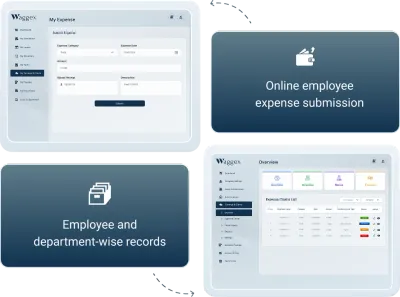
Online employee expense submission
Receipt and document attachments
Approval and rejection workflow
Reimbursement status tracking
Simplify Every Employee Expense Reimbursement
Replace manual expense claims with one structured workflow. Employees can submit expenses with receipts, managers approve requests faster, and finance teams process reimbursements accurately with complete visibility
Lost Receipts
Incomplete Information
Delayed Approvals
Duplicate Claims
Reimbursement Confusion
Spreadsheet Errors
ONE CONNECTED EXPENSE SYSTEM
Organize and Manage Employee Expense Claims Easily
Manage employee expenses through one centralized platform. From claim submission and approvals to receipt verification and reimbursements, Waggex keeps every expense organized, trackable, and ready for faster processing
Easy Expense Submission
Employees can submit expense claims in minutes by entering details and uploading receipts directly from the app.
Complete Claim Details
Capture expense category, amount, business purpose, payment date, and supporting receipts for every submission.
Real-Time Claim Tracking
Track every expense through pending, approved, rejected, reimbursed, or returned status from one dashboard.
Centralized Expense Records
Store every expense claim with complete history, receipts, and approval records in one searchable location.
Controlled Approval Workflow
Review, verify, and approve expense claims before reimbursement to maintain accuracy and financial control.
Payroll-Linked Reimbursements
Approved expense reimbursements flow directly into payroll, ensuring accurate payments in the correct salary cycle.
A Better Way to Manage Employee Business Expenses
Manage every employee expense from submission and approval to reimbursement through one connected platform built for faster, more organized expense management
Smart Expense Submission
Employees can submit business expenses in minutes with all required details, reducing paperwork and speeding up claim processing.
Organized Expense Categories
Categorize every claim to maintain accurate records, improve reporting, and simplify expense tracking across the business.
Receipt & Bill Storage
Attach invoices, receipts, and supporting documents directly to each claim, creating a complete record for verification.
Accurate Expense Details
Capture the expense date, amount, and reimbursement value to ensure every claim is processed correctly.
Business Justification
Record the purpose behind every expense to improve transparency, maintain compliance, and support internal audits.
Configurable Approval Flow
Route expense claims to the right manager or finance reviewer based on your company's approval process.
Faster Claim Decisions
Approve, reject, or return expense claims with comments, ensuring every submission is reviewed before reimbursement.
Live Claim Status
Employees and managers can track every claim from submission to reimbursement without unnecessary follow-ups.
Complete Claim History
Access every submitted expense, approval action, reimbursement, and supporting document from one centralized record.
Reimbursement Progress
Monitor approved claims until reimbursement is completed, giving employees complete visibility into every payment.
Payroll-Ready Reimbursements
Transfer approved expense reimbursements directly into the appropriate payroll cycle without manual data entry.
Actionable Expense Reports
Analyze submitted, approved, rejected, and reimbursed expenses to monitor spending and support financial decisions.
From Expense Claim to Reimbursement
Every expense follows a structured workflow for faster approvals, better visibility, and accurate reimbursements from one platform
Submit an Expense Claim
Employees create a new expense request with the required details from their Waggex account.
Add Expense Information
Enter the expense category, amount, business purpose, and other details needed for verification.
Attach Supporting Documents
Upload receipts, invoices, or bills to validate every expense before it moves for approval.
Review & Approve
The claim is routed to the assigned approver, who can approve, reject, or return it for changes.
Process Reimbursement
Approved expenses are recorded and prepared for reimbursement through the appropriate payroll cycle.
Track Every Claim
Employees and admin can monitor the status of every expense from submission to reimbursement.
Built for Faster, Smarter Expense Management
Replace scattered expense claims with one connected workflow. Waggex helps businesses collect complete expense information, speed up approvals, maintain accurate records, and reimburse employees without unnecessary manual work
Manual Expense Management vs Waggex Expense Management Software
Replace spreadsheets, emails, and paper receipts with one connected expense management workflow
| EXPENSE PROCESS | MANUAL PROCESS | WAGGEX |
|---|---|---|
| Expense Submission | Paper forms, emails, or spreadsheets | Submit expense claims digitally from one platform |
| Receipt Management | Physical bills or scattered attachments | Upload receipts directly with every expense claim |
| Expense Approvals | Email follow-ups and manual approvals | Automated approval workflow with real-time status |
| Claim Tracking | No visibility after submission | Track every claim from submission to reimbursement |
| Expense Records | Files stored across emails and spreadsheets | Centralized expense history with complete records |
| Reimbursement Processing | Manual calculations and payment tracking | Process approved reimbursements with payroll integration |
| Reporting & Audits | Prepare reports manually from multiple sources | Generate organized expense reports anytime |
Built to Handle Every Business Expense
Submit, approve and reimburse every type of employee business expense from one connected platform travel, meals, accommodation, field visits and more
Travel Expenses
Meal Expenses
Accommodation Expenses
Client Meeting Expenses
Communication Expenses
Field Employee Expenses
Employee Welfare Expenses
Office Purchase Expenses
Training and Event Expenses
Manage Every Type of Employee Business Expense
Authorised managers, HR users or finance teams can review each submitted claim before reimbursement
Review Claim Details
Check the employee, category, date, amount, business purpose and receipt.
Verify Supporting Documents
Confirm that the claim includes the required bills and information.
Approve Valid Claims
Move approved expenses to the reimbursement stage.
Reject Invalid Claims
Reject expenses that do not meet the company's policy.
Return Incomplete Claims
Send a request back to the employee when information is missing.
Maintain Approval Records
Keep the reviewer's decision and remarks linked to the claim.
Frequently Asked Questions
Everything you need to know about Waggex Employee Expense Management Software
Take Control of Employee Expense Management
Replace spreadsheets, emails, and manual approvals with one connected expense management system. Process reimbursements faster while keeping every claim accurate, organized, and payroll-ready
Download Waggex Mobile Apps
Access Company, Staff & FaceLens Apps on Android & iOS. Scan the QR code to download and get started quickly

Payroll Software - Waggex
Built for startups and companies to manage employees, attendance, payroll, shifts & daily operations from anywhere with one smart and easy-to-use HRMS platform.


Attendance App - Waggex
Employees can mark attendance, apply leaves, view payslips, manage tasks, and stay connected with HR from anywhere using the mobile app. Scan QR To Download App.


Biometric Attendance - Waggex
Transform any device into a smart attendance station with Waggex FaceLens App, featuring AI-powered face recognition, geo-fencing, and real-time employee attendance tracking.

Ready to Modernise Your HR?
Over 10,000 Indian businesses run their entire workforce on Waggex HRMS from payroll to performance, all in one place.