Simplify Employee Bonus Processing with Waggex
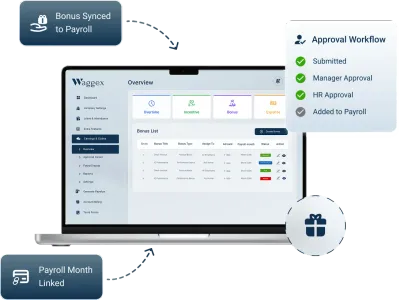
Create bonus policies, assign rewards to individuals or teams, track approval status, and process bonus payouts with confidence. Approved bonus amounts flow directly into payroll, ensuring accurate salary calculations and professional payslips every month
Try Free for 5 Employees
•No credit card required
Flexible Bonus Setting Formula
Project Completion Bonus
Approved And Including
Reduce Month Deduction
Still Managing Employee Bonuses Manually?
Many HR teams still manage employee bonuses using spreadsheets, emails and manual approvals. This leads to calculation mistakes, delayed approvals, payroll discrepancies and limited visibility across departments
Bonus Calculation Errors
Performance, incentive, and percentage-based bonuses can be miscalculated when salary and attendance data are managed manually.
Slow Approval Process
Bonus requests often remain pending because approvals are handled through emails, spreadsheets, or disconnected workflows.
Payroll Processing Delays
Approved bonuses may be missed or processed in the wrong payroll cycle, causing payment delays and employee dissatisfaction.
Duplicate Bonus Entries
The same employee bonus may be recorded multiple times when HR and payroll teams maintain separate records.
Scattered Bonus Records
Bonus policies, approvals, and payment history remain spread across multiple files, making audits, reporting, and compliance difficult.
Lack of Employee Visibility
Employees cannot easily track their bonus eligibility, approval status, or payment history, leading to confusion and frequent HR inquiries.
Create, Approve & Process Employee Bonuses in One Place
Waggex simplifies every stage of employee bonus management from creating bonus policies and selecting eligible employees to approvals, payroll processing and detailed reporting. Eliminate manual work, reduce payroll errors and ensure every bonus is processed accurately and on time
Select the bonus type
Choose Eligible Employees
Set Amount Type
Enter Bonus Value
Select Payroll Month
Set Bonus Frequency
Add Remarks & Approval
Process in Payroll
Powerful Bonus Features in One Platform
Manage every aspect of employee bonus creation, approval, calculation, and payroll inclusion from the Waggex HRMS platform
Create Bonus Records
Create structured bonus records with bonus name, category, amount, payroll month, eligibility rules, and payment reason.
Employee Bonus Assignment
Assign bonuses to an individual employee, selected employees, departments, or your entire workforce in just a few clicks.
Fixed Amount Bonuses
Award fixed bonus amounts for festivals, joining incentives, performance rewards, or any company-approved payment.
Percentage-Based Bonuses
Automatically calculate bonus amounts as a percentage of basic salary, gross salary, or other configured salary components.
Smart Bonus Calculator
Automatically calculate employee bonus amounts based on configured rules without using manual spreadsheets or formulas.
One-Time Bonus Payments
Create one-time bonuses for special rewards, incentives, or exceptional performance during a selected payroll cycle.
Recurring Bonus Automation
Schedule monthly, quarterly, or annual bonuses that are automatically processed according to your company policy.
Bonus Approval Workflow
Route bonus requests through configurable approval workflows before they are included in the payroll process.
Real-Time Bonus Status
Track every bonus from Draft, Pending, and Approved to Processed, Paid, and Rejected with complete visibility.
Integrated Payroll Processing
Approved bonus amounts are automatically included in the selected payroll cycle, reducing manual payroll work.
Bonus on Employee Payslips
Display approved bonus payments as separate earning components on employee payslips for complete transparency.
Bonus Reports & Analytics
Generate detailed bonus reports by employee, department, bonus type, payroll month, status, and payment history.
How Employee Bonus Management Works
Create, publish, and deliver company announcements instantly while ensuring employees receive timely workplace updates.
Create a New Bonus
Enter the bonus title and select the applicable bonus type.
Select Eligible Employees
Choose one employee, selected employees, a department, or the entire workforce.
Choose the Amount Type
Select a fixed amount or percentage-based calculation.
Calculate the Bonus
Enter the amount or use the Employee Bonus Calculator to apply the selected percentage.
Set the Frequency
Choose whether the bonus is one-time, monthly, quarterly, or annual.
Select the Payroll Month
Choose the salary cycle in which the Employee Bonus should be processed.
Set the Tax Treatment
Mark the bonus according to the company's payroll and tax configuration.
Remarks or Attachments
Include the reason, approval document, or other supporting information.
Submit for Approval
Send the bonus to the authorized reviewer.
Process Through Payroll
Once approved, the amount is included in the selected employee payroll cycle.
The Smarter Way to Manage Employee Bonuses
Waggex automates every stage of employee bonus management—from bonus creation and approvals to payroll processing and reporting. Replace spreadsheets with a centralized system that improves accuracy, saves HR time and ensures every bonus is processed on schedule
A Smarter Way to Manage Employee Bonuses
Replace Bonus Spreadsheets With a Structured Workflow
| BONUS ACTIVITY | MANUAL BONUS TRACKING | WAGGEX BONUS MANAGEMENT |
|---|---|---|
| Bonus Creation | Spreadsheet or email | Structured digital bonus record |
| Employee Selection | Manual employee list | Individual, selected, department or all |
| Bonus Types | Maintained inconsistently | Defined bonus categories |
| Amount Calculation | Manual calculation | Fixed or percentage-based |
| Bonus Status | Difficult to track | Pending, approved, rejected or processed |
| Employee History | Separate employee sheets | Employee-wise bonus history |
| Supporting Documents | Stored separately | Remarks and attachment with bonus |
Manage different types of Employee Bonuses
Create Bonuses According to Your Reward Policy
Diwali Bonus
Performance Bonus
Joining Bonus
Retention Bonus
Annual Bonus
Monthly Bonus
Project Completion Bonus
Attendance Bonus
Custom Bonus
Automatically Include Approved Bonuses in Payroll
Once a bonus is approved, Waggex automatically transfers it to the selected payroll cycle. Fixed and percentage-based bonuses are calculated accurately and added as earnings without manual intervention
Correct Payroll Month
Select the exact payroll cycle in which the bonus should be paid.
Employee-Wise Inclusion
Add the approved amount only to the selected employee's payroll record.
Separate Salary Component
Display the employee bonus separately from regular salary earnings.
Tax Classification
Apply the configured payroll treatment according to the bonus category and company policy.
Payslip Display
Show the processed bonus on the applicable employee payslip.
Reduced Reconciliation Work
Avoid comparing separate bonus sheets, approval emails, and payroll records at month-end.
Frequently Asked Questions
Everything you need to know about Waggex payroll software in India
Manage Every Employee Bonus From Approval to Payslip
Create, calculate and approve Employee Bonuses and include the correct amount in payroll without manual bonus sheets
Download Waggex Mobile Apps
Access Company, Staff & FaceLens Apps on Android & iOS. Scan the QR code to download and get started quickly

Payroll Software - Waggex
Built for startups and companies to manage employees, attendance, payroll, shifts & daily operations from anywhere with one smart and easy-to-use HRMS platform.


Attendance App - Waggex
Employees can mark attendance, apply leaves, view payslips, manage tasks, and stay connected with HR from anywhere using the mobile app. Scan QR To Download App.

Biometric Attendance - Waggex
Transform any device into a smart attendance station with Waggex FaceLens App, featuring AI-powered face recognition, geo-fencing, and real-time employee attendance tracking.

Ready to Modernise Your HR?
Over 10,000 Indian businesses run their entire workforce on Waggex HRMS from payroll to performance, all in one place.